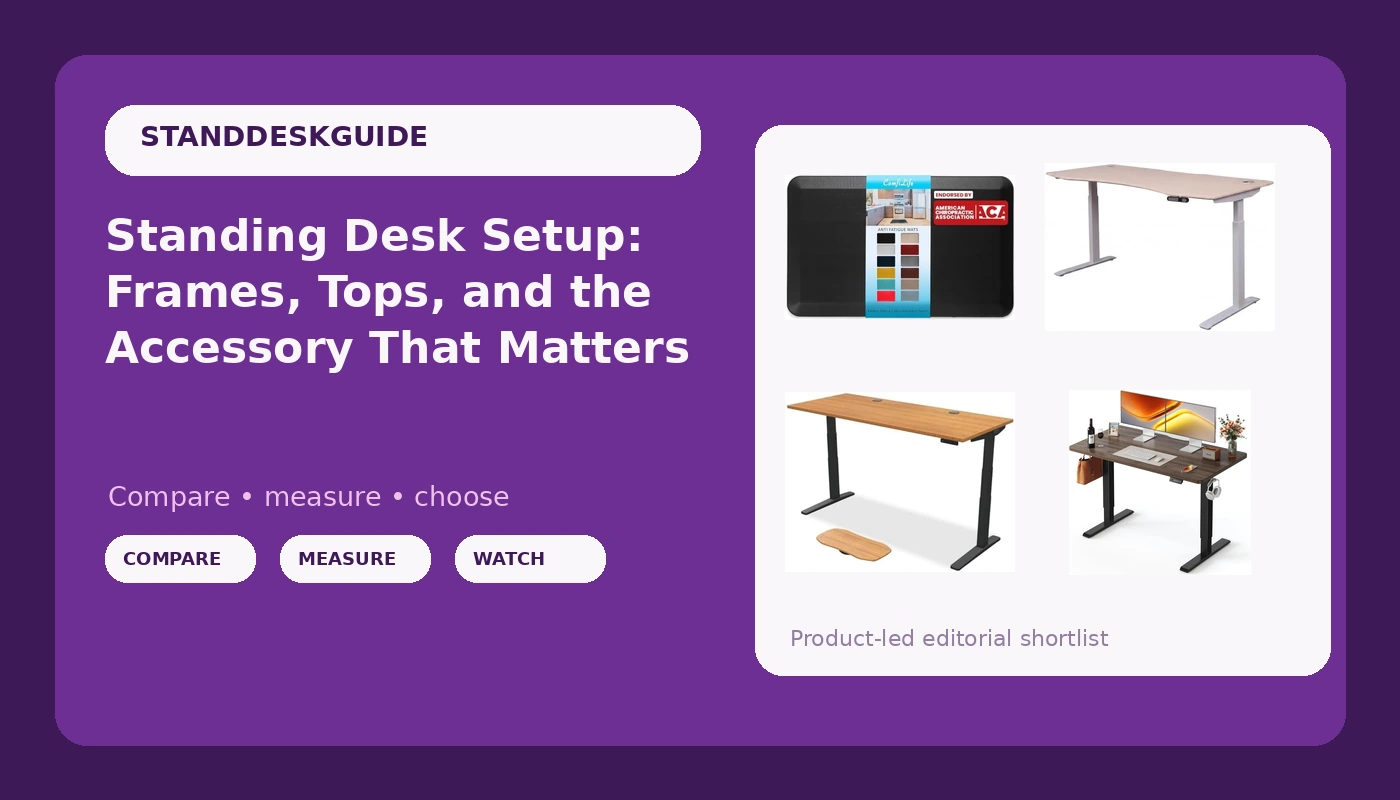
A standing desk setup is really three decisions stacked on top of each other: the frame that does the lifting, the top your hands and monitors live on, and the floor you stand on. Most buyers pour all their research into the first, ignore the other two, and end up with a very expensive fixed-height table by month three. This explainer covers what the spec sheets leave out, then lines up four real products at different points on the size curve so the trade-offs are visible side by side.
Related: How to Set Your Standing Desk Height Without Guessing →
Quick answer
Buy the largest frame your room allows, confirm the height range covers your standing elbow height, and budget for the floor layer before you budget for accessories. Of the options here, the FEZIBO Standing Desk is the compact entry at 48 by 24 inches, the ApexDesk Elite Pro sits in the middle at 60 by 27 inches with a curved oak top, the UPLIFT DESK Bamboo is the full-size 72 by 30 build with a V3 two-leg C-frame and a deeper accessory set, and the ComfiLife Anti Fatigue Floor Mat is the floor layer that makes long standing blocks easier to sustain. Nothing here is automatically right for you. Size, finish, and the height range you need are the deciding factors.
4 useful options
| Model | Best fit | What stands out |
|---|---|---|
| FEZIBO Standing Desk 48 × 24 Inch | Small rooms and first standing desks | Compact 48 by 24 inch top in a black walnut finish |
| ComfiLife Anti Fatigue Floor Mat | Anyone standing in blocks longer than an hour | 3/4 inch thickness, 20 by 32 inch surface, non-slip bottom |
| ApexDesk Elite Pro Series 60" x 27" | Mid-size rooms and two-monitor setups | 60 by 27 inch top with a curved oak finish |
| UPLIFT DESK Bamboo 72 x 30 inch | Full-size workstations | 72 by 30 inch bamboo top, V3 two-leg C-frame, advanced keypad, wire grommets, wire tray, rocker board |
The compact pick: FEZIBO Standing Desk 48 × 24 Inch
The trade-off with a 48 by 24 inch desk is depth, not width. Twenty-four inches is enough for a laptop, a keyboard, and one monitor on its own stand. It gets tight the moment you add a monitor arm, a second display, or a keyboard and a notebook side by side. If your room only supports a smaller footprint, that is a reasonable compromise to accept. If you have the wall space, the extra inches on a 60 or 72 inch top are usually the most cost-effective upgrade in the whole category.
The floor layer: ComfiLife Anti Fatigue Floor Mat
An anti-fatigue mat does not fix a bad standing height and it does not replace movement. What it does is give your feet, knees, and lower back something to work against, which is why the thickness matters more than the pattern printed on top. Three quarters of an inch is a meaningful cushion without turning into a balance challenge. The non-slip bottom matters on hardwood and laminate, where a plain rug will slide out from under you as the desk moves. Note the size: 20 by 32 inches covers a person standing roughly in one spot, not someone pacing the width of a 72 inch desk.
The mid-size option: ApexDesk Elite Pro Series 60" x 27"
Sixty inches of width is the threshold most people should aim for if they run two displays, because it leaves room for speakers or a laptop without crowding. The 27 inch depth is the number to check against your monitor arm reach and your own eyesight. The curved oak finish is the other half of the pitch: this is a desk meant to be seen in a living space rather than hidden in a spare bedroom. The trade-off is floor space. Measure the door swing and the chair travel behind you before you commit to a top this size.
The full-size build: UPLIFT DESK Bamboo 72 x 30 inch
Seventy-two by 30 inches is a lot of desk, and the included accessories lean into that. Wire grommets and a wire tray mean the cable problem is at least partly solved before the desk arrives, and the rocker board gives you something to do with your feet besides standing still. The two-leg V3 C-frame is the part that matters over a five-year horizon. C-frame geometry places the lifting columns toward the back of the desk, which changes how the desk behaves when you lean on the front edge. Bamboo is also a sensible top material: dense, it takes a finish well, and it hides small scratches better than dark laminate.
Prices and availability may change. Product images, names, and retailer links are matched to verified listings. No current price, rating, stock status, or measured result is stated here without current evidence.
What "electric height adjustable" does not tell you
Every product on this list carries the same headline phrase, and none of them means the same thing by it. Height adjustable describes a mechanism, not a range. Two desks can both be electric height adjustable while one stops below the standing height a taller user needs and the other goes well past it. Before you compare anything else, find the minimum and maximum height and check them against your own body. Seated, your elbows should rest near 90 degrees with forearms level. Standing, your elbows should land a couple of inches below shoulder height with your wrists flat.
Then look at the surface. A 48 by 24 inch top and a 72 by 30 inch top are different pieces of furniture, not different sizes of the same thing. Depth decides whether a monitor arm is usable at a sensible viewing distance. Width decides whether two displays and a laptop fit without a fight. Finish decides whether you want to look at the thing every day. Those three numbers plus one line of finish description do more to determine whether you keep the desk than any motor specification on the page.
Stability is a geometry problem, not a weight problem
Wobble is what kills standing desks, and it is almost never caused by the motor. It is caused by geometry. A desk is a frame with a lever arm on top of it, and the further your monitor sits from the lifting columns, the more leverage it has. That is why two desks with near-identical specs can feel completely different at standing height.
Three variables do most of the work. The first is whether a crossbar ties the legs together, because that resists side-to-side sway. The second is frame shape: a C-frame puts the columns toward the back, a T-frame centers them, and each behaves differently when you rest your forearms on the front edge. The third is the floor. Carpet with a thick pad acts as a suspension system and will amplify sway that a hardwood floor would absorb. You cannot test any of this from a listing photo, so read the height range and the frame description carefully and treat stability as a claim to verify rather than a feature to assume.
- Measure your seated elbow height and your standing elbow height before you shop. These two numbers define the range you actually need.
- Confirm the desk's minimum and maximum height bracket that range with a little headroom on both ends.
- Decide your top size from your monitor count and viewing distance, not from room dimensions alone.
- Set aside part of the budget for the floor layer, because a mat costs far less than replacing a desk you stopped using.
- Check the controller for memory presets and a working anti-collision sensor, since those two features decide whether you change heights during the day.
Practical guidance for a standing desk setup
- Measure the wall, the door swing, and the chair travel before ordering. A 72 inch top is unforgiving in a small room.
- Treat a 24 inch depth as a laptop-and-one-monitor desk, and the 27 to 30 inch range as the point where monitor arms start to earn their place.
- Pick a finish you will still like in three years. Dark walnut and light bamboo age very differently under daylight.
- If you stand in one place for long stretches, add an anti-fatigue mat with a non-slip base rather than a thick rug that slides.
- Use the wire tray and grommets if the desk includes them. Cables that hang free are the first thing to fail when the desk moves.
Which option should you choose?
Choose the FEZIBO Standing Desk 48 × 24 Inch when the room is small and the budget is the binding constraint, and you work from a laptop with at most one monitor. Choose the ApexDesk Elite Pro Series 60" x 27" when you want a 60 inch top for two displays and a finish that looks intentional in a shared room. Choose the UPLIFT DESK Bamboo 72 x 30 inch when you have the floor space and want the frame, the keypad, and the cable management sorted in one purchase. Choose the ComfiLife Anti Fatigue Floor Mat alongside whichever desk you pick if you plan to stand in blocks longer than an hour.
That last point is the one most buyers skip. A mat is not a substitute for the right height and it is not a substitute for moving around, but it is the cheapest change you can make to a setup that already exists.
No measurement result, current price, rating, or stock status is quoted above. Sizes, finishes, and included accessories come from the product listings, and those are the details worth checking against your own space before you buy.
The bottom line
A standing desk setup works when the height range fits your body, the top size fits your equipment, and the floor under your feet is comfortable enough that you keep standing. Start with the two elbow measurements, then choose the largest top your room can take, then add the floor layer. The FEZIBO is the compact starting point, the ApexDesk Elite Pro is the mid-size middle ground, the UPLIFT DESK Bamboo is the full-size build with the deepest accessory set, and the ComfiLife mat is the accessory that quietly determines how often you actually press the button.