Related: Standing Desk Wobble: Why Your Frame Sways at Full Height
I designed office furniture for six years before I started writing about it, and the lesson that stuck is that an affordable electric standing desk lives or dies on geometry. Not the finish, not the app, not the little cable clips in the box. The triangle formed by the two lifting columns, the feet, and the top is the whole ballgame, and everything else is decoration.
So when I look at affordable electric standing desks, I am not reading the bullet points. I am asking whether the frame has a crossbar, whether the top is one piece or two, and whether the controller will still remember my two heights after the power flickers during a Portland windstorm. Those three things decide whether you actually press the button in month three or leave the desk parked at sitting height forever.
Below are four desks I would put on a shortlist right now: a solid wood model with a built-in drawer, two sizes of the same BANTI frame, and a thin-top SIAGO that undercuts all of them. I will tell you what each one is for, and I will tell you the checks that separate a keeper from a return.
How I judge an electric standing desk
Three weeks of daily use at both heights is my rule before I will call a frame a long-term keeper, and no listing photo replaces that. What I can do here is hand you the shortlist and the test plan, because the tests are cheap and they catch the failures that matter.
The loaded wobble test. Raise the desk to the height you actually type at, load it the way you really work, and type hard for two minutes. Wobble is a geometry problem, not a weight problem. A frame with a wide foot and a crossbar braces itself into a triangle. A frame without a crossbar sways regardless of how heavy the top is, and it sways worst at the exact height you need most.
The power-cycle test. Set two presets, unplug the desk, wait a minute, plug it back in. If the controller forgets your heights, you will quietly stop using the standing feature within a month. That is the failure mode nobody mentions in the reviews, and it has nothing to do with the motor.
The motor and crossbar check. Two lifting columns and a crossbar is the minimum I would accept in 2026. A single motor strains under a real load, and the top sags at one end over time. Ask the question before checkout, not after.
I also run a cable management audit on day one, because a desk you fight with is a desk you stop raising. A tray, a couple of velcro straps, and a power strip mounted to the underside do more for daily use than any accessory sold on the same page.
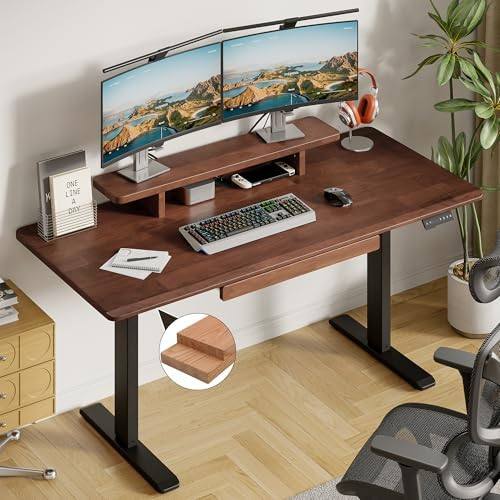
The one with a drawer: ONBRILL Standing Desk with Drawer
This is the desk in the group that solves a problem instead of adding a feature. The drawer is the point. A notebook, two pens, a pair of headphones, a charging cable, all of it disappears, and the desktop stays clear enough that you can actually raise the desk without sweeping things onto the floor first. If you have ever watched a mug slide toward the edge of a lifting top, you know why storage matters more than another preset button.
The 47 x 23.6 inch top is solid wood, which is the detail I would pay attention to. Solid wood takes a clamp-mounted monitor arm and a screw-in grommet without the crush and dimple you get on a hollow core board, and it feels like furniture rather than a slab. It also moves with the seasons. In a Portland winter with the heat running, expect a little expansion and contraction, so do not overtighten anything that passes through the top.
The tradeoff is knee clearance. A drawer under the top eats vertical room, so sit in your chair at your normal height before you commit. If you are tall, this is the one desk on the list I would measure twice.
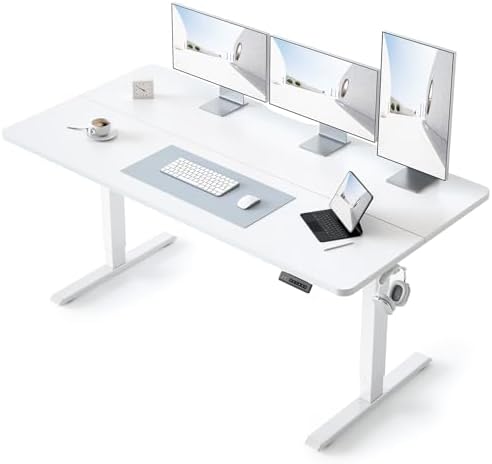
The wide one: BANTI 55 x 24, White Frame and White Top
Fifty-five inches is the width where a desk stops being a laptop table and starts being a workstation. Two monitors on a single arm, or a monitor plus a laptop plus a notepad, fits without the tower of clutter that a 48 inch top forces. If you have ever turned your keyboard sideways to make room for a coffee cup, this is the size that fixes it.
The top is a splice board, meaning it ships as two pieces joined into one surface. That is normal at this size and it is not a defect, but the seam is the one thing to inspect on arrival. Align the two halves before you tighten the frame bolts, check that they sit flush with no lip, and run your mouse across the seam once the desk is built. A seam that sits proud will catch your wrist for the next five years.
The white frame and white top read bright and light, which helps in a small room with one window. White also shows every coffee ring and ink smudge, so this is the version for someone who keeps a coaster within reach.
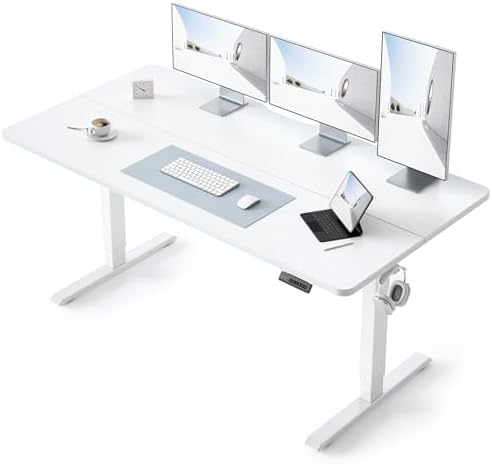
The value pick: BANTI 48 x 24, Black Frame and Black Walnut Top
Same frame family as the 55 inch BANTI, in the footprint most people should actually buy. Forty-eight by twenty-four inches is the classic one monitor, one laptop, one lamp arrangement, and it fits in a bedroom or a corner without dominating the room. If you are honest about how much desk you use, this is probably the size.
The black walnut finish is the practical choice of the two BANTI versions. A dark top hides dust, fingerprints, and the faint scratches that appear after a year of sliding a keyboard around. It also reads warmer than white in a living room, which matters if the desk is visible from the couch. The same splice board caveat applies: get the seam flush before you finalize the frame bolts.
The entry point: SIAGO 48 x 24 Electric Standing Desk
This is the lowest cost of admission in the group, and the number worth noticing is in the name. A 0.8 inch tabletop is a thicker board than the paper-thin surfaces that show up at the bottom of the market, and thickness is what resists bowing when you clamp a monitor arm to the back edge. Thinner tops flex, and a flexing top is a wobble you feel through your wrists even when the frame itself is steady.
The 48 x 24 inch footprint matches the BANTI, so you are choosing between finishes and extras rather than between usable work areas. What you give up is the drawer and the wood top. What you keep is the height adjustment and the same basic sit and stand routine.
My honest advice for this one: budget for a cable tray and a power strip at the same time. The desk is the cheap part of a standing setup, and the accessories are what keep it from becoming a tangle you avoid.
The four desks side by side
| Desk | Top | Footprint | Best for |
|---|---|---|---|
 Visit on Amazon → Visit on Amazon →ONBRILL Standing Desk with Drawer |
Solid wood, one piece | 47 x 23.6 in | Storage inside the desk |
 Visit on Amazon → Visit on Amazon →BANTI 55 x 24 Standing Desk |
Splice board, white | 55 x 24 in | Dual monitors, wide setups |
 Visit on Amazon → Visit on Amazon →BANTI 48 x 24 Standing Desk |
Splice board, black walnut | 48 x 24 in | The value pick |
 Visit on Amazon → Visit on Amazon →SIAGO 48 x 24 Electric Standing Desk |
0.8 in thick board | 48 x 24 in | A first standing desk |
What "splice board" actually means for your setup
Two of the four desks here ship with a splice board top, and buyers read that phrase as a downgrade when it is really just a shipping decision. A 55 inch surface is awkward and expensive to move in one piece, so it arrives as two halves that bolt together. The upside is a lower price and a box that fits through a doorway. The downside is a seam.
Treat the seam like a joint in a tabletop. Build the top first, on the floor, before it goes anywhere near the frame. Loosen, align, then tighten in a star pattern so the two halves meet flush. Once the desk is standing, run a mouse across the seam and a finger along it. If you can feel a lip, take the top back off and redo it. This is a ten minute job that saves you a daily annoyance.
Cable management, because it decides whether you raise the desk
A standing desk that never stands is usually a cable problem. Every cable has to have enough slack for the full travel of the frame, and the only way to guarantee that is to route everything through a tray attached to the underside of the top, not to the wall. Mount a power strip in the same tray, leave a service loop near the controller, and strap the slack so nothing dangles into the travel path. Do this on day one and you will use the height feature for years. Skip it and you will lower the desk once and leave it there.
Should you buy the ONBRILL standing desk with a drawer?
Yes, if storage is what you are missing. The solid wood top is the nicest surface in this group, the drawer keeps the desktop clear, and the 47 x 23.6 inch footprint fits a monitor and a laptop without crowding a bedroom. Measure your knee clearance first, because the drawer takes space under the top, and check that the top is flat when it arrives. If you are tall and you like to sit high, this is the one to think about hardest.
Should you buy the BANTI 55 inch standing desk?
Yes, if your setup is genuinely wide. Two monitors or a monitor plus a laptop plus paper fits here in a way it does not on a 48 inch top. Inspect the splice seam before you assemble the frame, align it on the floor, and accept that a white top needs a coaster. The extra width is worth it only if you will use it. If you are a one-screen person, the 48 inch version of the same desk is the smarter buy.
Should you buy the BANTI 48 inch standing desk?
This is the one I would point most people toward. It is the best balance in the group between price, footprint, and finish, the black walnut top hides a year of real use, and 48 x 24 inches is the size that fits an actual home office rather than a fantasy one. Same splice board caveat, same assembly advice. If you want a single recommendation from this page, this is it.
Should you buy the SIAGO standing desk?
Yes, if you want the lowest entry point and you understand what you are giving up. The 0.8 inch tabletop is the real selling point, since a thicker board resists bowing under a clamp arm, and the 48 x 24 inch surface is the same working area as the BANTI. You lose the drawer and the wood finish. Add a cable tray and a power strip to the order, run the day one checks, and it will do the job.
The bottom line
Buy the frame, then live with the top. That is the order that matters. Any of these four will hold a monitor and move up and down, and the differences between them come down to storage, width, surface, and how much you want to spend on the parts you touch every day.
Run the three tests on day one. Load the desk at standing height and type hard. Pull the plug and see if your presets survive. Check that the frame has two motors and a crossbar. If a desk passes those, you will still be raising it in three years. If it fails one, return it while the box is still in the hallway.