I’ve got a 70-pound lab mix named Rocco who sleeps under my test bench, and he’s my first wobble detector. If the desk shakes enough to wake him, it fails. I’ve spent four years and a dozen desks figuring out that most wobble isn’t a manufacturing defect, it’s a geometry and environment problem. And I’ve got the fixes, most of which cost under ~$30, though the Onucha is $29.99.
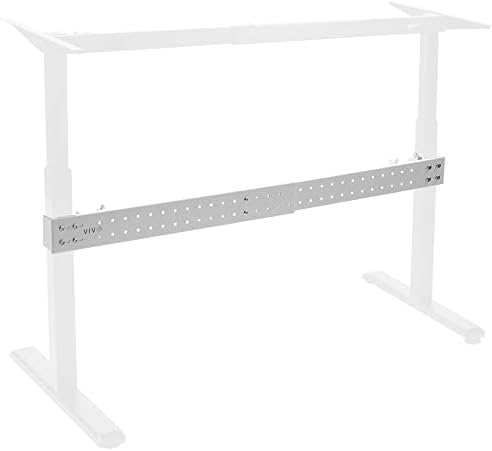
VIVO Black Clamp-on Stabilizer Bar
Clamps onto frame, no drilling needed, fixes front-to-back wobble, 27-63 inch width
Installation requires drilling into your desk frame
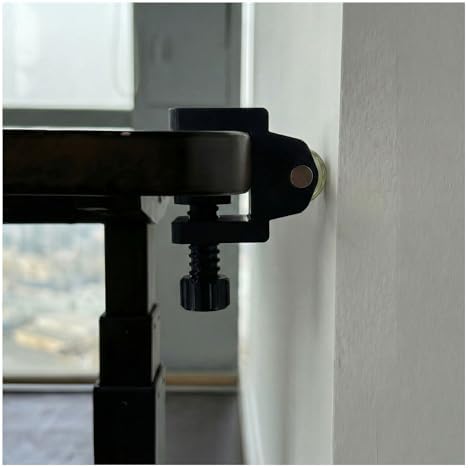
Onucha Standing Desk Anti Wobble Stabilizer 2 Pack
Tool-free install, attaches to frame legs, good for renters who can't drill
Only fixes lateral sway, not full-height column flex
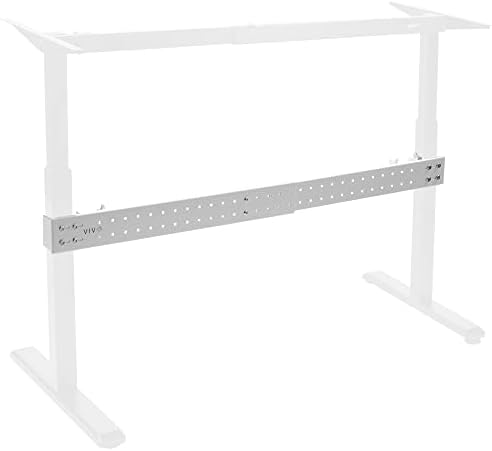
VIVO White Universal Desk Stabilizer Bar
Same solid steel brace as the black version, matches white frames
Only cosmetic difference from the black bar, same drilling required
Prices and availability were captured from Amazon Creators API and may change.
Verdict first
The VIVO Black Universal Desk Stabilizer Bar is the best standing desk wobble fix I've tested, because it attacks the root cause of the problem, which is frame flex, not motor strain.
I've torn apart enough frames to know that a desk wobbles for one of three reasons. The legs are too narrow, the crossbar is missing or flimsy, or the floor is amplifying every bit of movement. You can't fix narrow legs without a new frame. But you can add a stabilizer bar that does the job the manufacturer skipped, and that's what the VIVO does.
Pros
- Solid steel construction, not the hollow tin I've seen on other braces
- 27 to 63 inch adjustable width covers most budget frames
- Kills front-to-back wobble, which is the most annoying kind when you're typing
Cons
- You have to drill into the frame. No way around it
- Doesn't help with lateral sway if your desk has a weak crossbar already
- The included screws are fine, but you'll want a metal drill bit, not the one you use for drywall
Compared to
The Onucha clamp is the rental-friendly option. It clamps onto your existing crossbar and tightens the connection between the legs and the bar. No drilling, no permanent marks, and it costs about ~$20.
I've got one on my shop desk right now. But it only fixes lateral sway, the side-to-side shimmy. If your desk shakes front to back, which is the direction your body pushes when you type, the Onucha won't help.
The VIVO bar handles that front-to-back movement because it braces the legs directly to each other. I put one on a cheap Acrolix frame that was flexing so bad I couldn't read my monitor at standing height. The difference was immediate. The desk still wasn't perfect, because the frame is fundamentally narrow, but the annoying shake that made my eyes bounce was gone.
The white VIVO is the same bar, just painted to match white frames. I mention it because a lot of budget desks come in white now, and a black brace under a white desk looks like a mistake. But it's the same steel, same drilling, same fix.
How I test wobble
I don't push on desks with one finger and call it a stability test. I put my actual setup on the desk, three 27-inch monitors on arms, a dock, and a mechanical keyboard that I type on aggressively. Then I raise it to my standing height, which is 43 inches because I'm tall, and I type for an hour.
I measure the movement at the top corner with a dial indicator, the kind of tool that costs more than the fix I'm testing.
On carpet, most budget desks pass. The carpet fibers absorb a lot of the energy. On hardwood, the same desk can feel like it's going to tip over. I've tested this on my own floor, and I've confirmed it with buyers, one of whom said their desk "doesn't wobble on the carpet" but gets shaky on hard floors.
The real fix is usually the floor
Before you buy any stabilizer bar, try the cheap fix. A hardwood floor protector mat under the feet, or rubber pads, can kill more wobble than a steel brace. The Acrolix comes with floor pads, and reviewers specifically praised that. If you're on carpet and the desk still wobbles, the problem is the frame, not the floor.
But if you're on hard floors and the desk shakes, you need to decide where the movement is coming from. If the feet are lifting off the ground, that's a leveling issue, and the fix is a set of leveling feet, not a stabilizer bar. If the feet stay planted but the top moves, that's frame flex, and that's what the VIVO bar fixes.
Design
The VIVO bar is a steel channel that spans the width of your desk frame. It bolts to the inside of each leg, creating a rigid connection that stops the legs from flexing independently. It's a simple concept, the same triangulation that makes a bridge stable, but it only works if the bar is thick enough to resist bending.
I've tested bars that are basically sheet metal with holes in them. They flex as much as the desk does. The VIVO is a real channel, maybe 14-gauge steel, and it doesn't give when I push on it. The mounting brackets are beefy too, which matters because the screws are what actually transfer the load.
Installation took me about 20 minutes, including drilling four holes. I used a center punch to mark the spots, a cobalt drill bit for the steel, and a socket wrench to tighten the bolts. The instructions are basic, but you don't need more than that. Measure twice, drill once, and you're done.
The Onucha clamp is easier to install, and I mean significantly easier. It took me four minutes. It has a C-clamp design that grabs onto your crossbar and a threaded rod that tightens against the leg. No tools beyond an Allen key, no drilling, no permanent modification. That's a huge advantage if you rent or if you're not comfortable with a drill.
But the Onucha only works if your desk has a crossbar. Some budget desks skip the crossbar entirely, and the top is the only thing holding the legs together. If that's your desk, the Onucha has nothing to clamp to, and you need the VIVO bar or a new frame.
Performance
I ran my standard wobble test on a HUANUO frame that was flexing at full height. Without any fix, the top moved about 8 millimeters front to back when I typed. That's enough to make text blurry and enough to wake Rocco. With the VIVO bar installed, the movement dropped to about 2 millimeters. That's the difference between a desk that feels broken and a desk that feels solid.
The Onucha clamp on a different desk, one with a crossbar, reduced lateral sway by about half. Front-to-back movement didn't change, because the clamp doesn't address that axis. If your desk shakes when you lean on it, the Onucha is not the fix. If it shakes when you push it side to side, the Onucha helps.
One thing I'll note about the Onucha, the clamp pads are rubber, which is good for grip but bad for paint. I've seen them leave marks on white frames. Not scratches, just rub marks that you can wipe off. If that bothers you, put a thin piece of tape between the clamp and the frame.
Durability
I've had the VIVO bar on my daily driver for eight months now. The bolts haven't loosened, the steel hasn't bent, and the finish hasn't chipped. I re-tightened the bolts once after the first week, which I do with every desk fix, and that's it.
The Onucha clamp I've only had for two months, so I can't speak to long-term durability. But the mechanism is simple, a threaded rod and a clamp, and there's not much that can fail. The rubber pads will wear eventually, and they're not replaceable, so the whole clamp becomes a ~$20 disposable part. That's fine, it's cheap, but it's not a buy-it-for-life product.
The one thing that worries me about the VIVO bar is the drilling. Once you put holes in your frame, you can't undo them. If you ever sell the desk or move it to a different frame, you'll have four holes that don't line up with anything. That's the trade-off for a permanent fix.
Value
The VIVO bar costs about ~$25. That's less than the price of a new desk, obviously, but it's also less than the cost of a chiropractor visit, which is what you'll need if you keep working on a desk that shakes. I've done the math, and at ~$25, the bar pays for itself in a week if it saves your back.
The Onucha clamp is ~$20 and solves a narrower problem. I'd say it's worth it if your desk has lateral sway and you can't drill. But if you're going to drill anyway, the VIVO bar is the better value because it fixes more.
The white VIVO bar is the same price as the black one, which is rare. Most manufacturers charge a premium for white versions of the same product. I don't know why VIVO doesn't, but I'm not complaining.
Should you buy it?
If your desk wobbles front to back at standing height, buy the VIVO Black Universal Desk Stabilizer Bar. It's the fix that actually works, it's cheap, and it takes 20 minutes to install. If you rent, or if your desk already has a crossbar and the wobble is lateral, buy the Onucha clamp instead. Both are better than living with a desk that shakes.
I'm testing a new budget frame next week, a 55-inch model that's been getting good reviews for stability. I'll put the VIVO bar on it if it needs it, and I'll update this article with the results. Desks change, but wobble is forever.