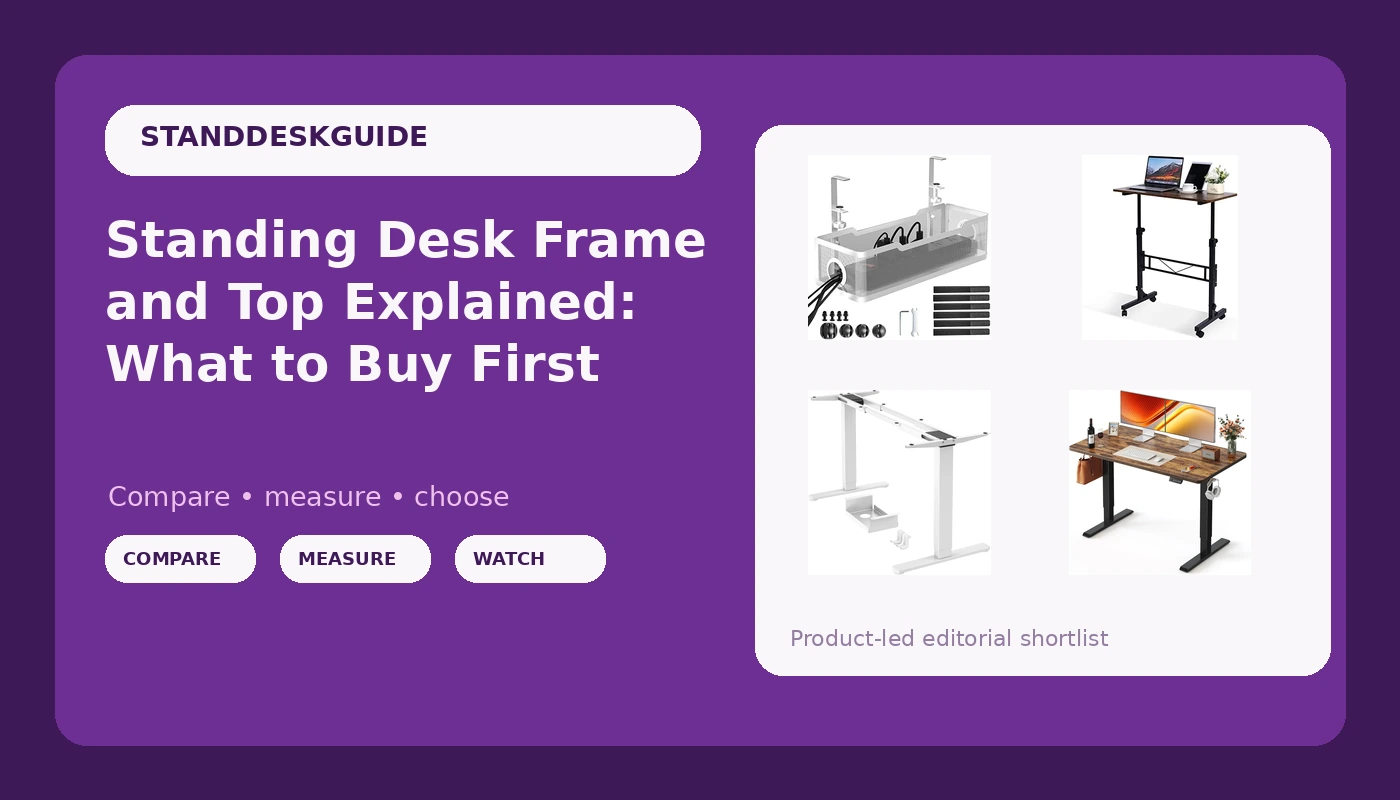
Buying a standing desk looks like one decision. It is really three: the frame, the desktop, and the accessories that keep the finished desk usable. A standing desk frame and top bought separately can beat a bundled desk on stability per dollar, and a bundled desk can beat a separate build on convenience. The trouble is that product listings blur the line. Of the four options below, one is a complete desk, one is a mobile desk on wheels, one is a frame and legs with no top at all, and one is a clamp-on cable tray. Read those four as if they were four versions of the same product and you will buy the wrong thing.
This explainer sorts them by what they actually are, then covers the frame geometry that decides whether a height adjustable desk stays steady once it is raised. The short version: the top is a slab, the frame is the machine.
Related: Dual Motor vs Single Motor Standing Desk Frames →
Quick answer
There is no single best pick here, because these four listings solve four different problems. If you already own a desktop you like, the ErGear dual motor legs are the frame-only route: they fit desktops from 44 to 90 inches and are rated for 264 lbs. If you want everything in one order, the FEZIBO 48 × 24 inch electric desk is the complete option. If the desk has to move between rooms, the KLSMYHOKI desk with wheels is the mobile one. If the mess under the desk is the real problem, the Cinati no-drill tray clamps on without damaging the surface.
Four useful options
| Model | Best fit | What stands out |
|---|---|---|
| FEZIBO Standing Desk 48 × 24 Inch Electric Height Adjustable, Rustic Brown | One-order complete desk for a fixed spot | 48 × 24 inch desktop included, electric height adjustment, rustic brown finish |
| ErGear Dual Motor Standing Desk Legs for 44-90 inch Desktops, 264 lbs | Buyers who already have a desktop | Dual motor frame, desktop range of 44 to 90 inches, 264 lbs rating |
| KLSMYHOKI Standing Desk Adjustable Height, Mobile Stand Up Desk with Wheels | Rooms that have to reconfigure | Adjustable height on a wheeled base |
| Under Desk Cable Management Tray White, Cinati Wire Organizers No Drill, Cable Tray with Clamp | Anyone whose cables are the problem | Clamp mounting with no drilling and no damage to the desk |
The complete desk: FEZIBO Standing Desk
A 48 by 24 inch top is the standard starter footprint for a height adjustable desk, and it is a reasonable one: deep enough for a monitor on a stand or arm plus a keyboard, and narrow enough to fit a bedroom or a corner. The trade-off with a complete desk is that the top and frame arrive matched, which is convenient right up to the moment you want to change one of them. Mounting hole patterns vary between brands, so swapping the top later usually means drilling new holes in the new slab or building an adapter plate. If you expect to keep the same desktop for a decade and change frames around it, start with a frame instead.
The frame-only route: ErGear Dual Motor Standing Desk Legs
This is the listing that assumes you already have, or want to choose, your own desktop. The frame accepts desktops from 44 to 90 inches wide, which covers everything from a compact apartment top to a long shared work surface, and it is rated for 264 lbs. Two motors mean two lifting columns instead of one, which matters because a single column has to fight the leverage of an off-center load on its own. The cost of the frame-only route is the work: you source the top, drill the pilot holes, and take responsibility for the mounting pattern and the weight. In exchange you get to pick the surface you actually want, from butcher block to laminate.
The mobile option: KLSMYHOKI Standing Desk with Wheels
Wheels change what a desk is for. A mobile stand up desk can be pushed out of the way when a room has to serve another purpose, rolled to a different wall for a call, or shared between two people who want different setups. The trade-off is stability. A rolling base meets the floor through small casters instead of broad feet, and every joint between the caster and the frame adds a little movement. If you go mobile, look for casters that lock, keep the desk on a hard floor rather than deep carpet, and expect to manage cables differently, because a desk that moves will pull on anything that stays still.
The cable fix: Cinati Under Desk Cable Management Tray
A clamp-on tray solves a problem the desk purchase does not: the cables still have to go somewhere, and a power strip sitting on the floor collects dust and gets kicked. This tray mounts under the desk edge with a clamp, so there is no drilling and no damage to the surface, and it can travel with you if you change desks later. Two limits are worth checking first. The clamp needs a clean, flat edge of workable thickness, so measure the desk edge and look for an apron, crossbar, or control box in the way. And a clamp-on tray carries cables and a small power strip, not a pile of brick-heavy transformers.
Prices and availability may change. Product images, names, and retailer links are matched to verified listings. No current price, rating, stock status, or measured result is stated here without current evidence.
Why the frame decides how a desk feels
Standing desk stability is a geometry problem before it is a weight problem. Picture the desk from the side: the feet form the base, the lifting columns rise from them, and the desktop sits on top. The triangle between the front foot, the back foot, and the top of the column is what resists the side-to-side sway you feel while typing at standing height. Make the base shallower front to back and that triangle gets sharper. Raise the desk and the columns extend, which lengthens the unsupported span. That is why the same desk can feel solid at sitting height and vague at standing height, and it is why a crossbar under the middle helps: it braces the frame's weakest plane.
Two lifting columns instead of one spread the load and reduce the leverage any single column has to absorb, which is why a dual motor frame is the sensible baseline for anything that will hold a monitor, a laptop, and a person leaning on the edge. The desktop contributes too, but mostly as stiffness across the span. A long, thin top on a short base will flex and amplify movement. A shorter top on the same base will feel tighter, even though the frame has not changed at all. When you compare a complete desk against a frame plus your own top, you are comparing the same geometry question with a different slab on top of it.
What the listings will not tell you
Product listings describe parts, not behavior. You will see a desktop size, a weight rating, a motor count, and a mounting method. You will not see how the controller behaves after a power cut, whether the memory presets survive one, how the anti-collision system responds to a chair arm, or how loud the motors are in a quiet room. Those are the details that decide whether you keep using the height adjustment or leave the desk parked at one height forever.
Weight ratings deserve their own note. A 264 lb rating describes what the frame can lift, not how steady it will be at full height, and those are different questions with different answers. Before buying, decide which behaviors you will actually check on day one, and treat the rest as marketing copy.
- Decide whether you are buying a desk or a frame. If you already own a desktop you like, buy legs and keep it. If you do not, a complete desk removes a decision.
- Measure the space before you compare specs. Width changes the feel of a desk more than any other single number, and a 48 inch desk and a 60 inch desk are different pieces of furniture.
- Match the frame to the top. Check the desktop range and the weight rating against the slab you plan to use, and check the mounting hole pattern before you drill anything.
- Ask what the controller actually does. Memory presets and working collision detection are the difference between a desk you adjust daily and one you adjust twice.
- Plan cables and mobility at the same time as the desk. A tray, a power strip, and a service loop of slack are far easier to install before the desk is loaded.
Cable routing, mobility, and assembly order
- Build the frame upside down on a soft surface, and mount the top before flipping the desk if you are assembling a frame-only setup.
- Leave a loop of cable slack at the control box so the desk can travel its full height range without pulling on a connector.
- Route cables down the back of a column rather than across the underside, where they catch on knees and chair arms.
- If you use a clamp-on tray, measure the desk edge thickness and confirm no apron, crossbar, or control box sits where the clamp needs to go.
- If the desk has wheels, check that they lock, and keep it on hard flooring where casters can roll without digging in.
Which option should you choose?
Choose the FEZIBO Standing Desk 48 × 24 Inch Electric Height Adjustable, Rustic Brown when you want a complete height adjustable desk in one purchase and the rustic brown finish suits the room. Choose the ErGear Dual Motor Standing Desk Legs for 44-90 inch Desktops, 264 lbs when you already own a desktop, or when you want a wider surface than a bundled desk offers and are willing to drill mounting holes. Choose the KLSMYHOKI Standing Desk Adjustable Height, Mobile Stand Up Desk with Wheels when the desk has to move, whether between rooms or out of the way at the end of the day. Choose the Under Desk Cable Management Tray White, Cinati Wire Organizers No Drill, Cable Tray with Clamp when the desk is already settled and the cables are the remaining problem.
One caveat: these are different categories of product, and nothing here establishes how any of them behaves under a loaded stability test. The desktop range and the weight rating come from the listings themselves. Treat those numbers as the starting point for your own check rather than a substitute for it.
The bottom line
If you remember one thing, make it the frame-versus-top split. A standing desk frame and top are two separate purchases even when they arrive in one box, and the frame does most of the work. Buy the frame that matches your space, your top, and your load, then decide separately whether the desk needs to move and where the cables go. A complete desk is the fastest route to a working setup, a frame plus your own top is the most flexible, wheels solve a room problem rather than a desk problem, and a clamp-on tray deals with the mess you would otherwise look at every day. Check current Amazon price on each listing before you commit, because availability in this category moves quickly.