How To Clean A Standing Desk
The thing nobody tells you about owning a standing desk is that you're suddenly responsible for a piece of machinery that lives in the same room where you eat lunch. I've had my daily driver for three years now, and between Gus's fur, coffee splatter, and the fine layer of sawdust that follows me in from the shop, I've developed a cleaning routine that keeps the motors happy and the top presentable.
This guide covers what actually works, what damages the finish, and why most "standing desk cleaner" products are a waste of money.
Why you should trust me
I'm Marcus, a former office furniture designer who's spent four years tearing apart standing desks in my shop. I've got five of them in various states of disassembly, a 70-pound lab mix named Gus who sheds on everything, and a spreadsheet where I track which cleaning methods damage which surfaces.
I've cleaned laminate tops, solid wood, and HPL surfaces. I've also fixed two desks that died from improper cleaning, which is more than I can say for most people writing about this topic.
How I picked
My criteria were simple: what actually removes the grime without harming the desk, what keeps the motor and controller working, and what doesn't cost more than the desk itself. I tested cleaning solutions on scrap pieces of laminate and HPL before touching my daily driver.
I also checked the warranty language on three budget desks, because that's where manufacturers hide the "don't use harsh chemicals" warnings.
I tested for three months, cleaning weekly with different methods. I measured how long each approach took, whether it left streaks, and whether the surface attracted more dust afterward. I also tracked which cleaning mistakes showed up in Amazon reviews, because there's a pattern of people destroying their desks with the wrong products.
Our pick: The microfiber cloth and mild soap routine
Here's the thing: you don't need a special cleaner. You need a microfiber cloth, warm water, and a drop of dish soap. That's it. I've cleaned every desk in my shop with this method, and it handles coffee rings, dust, and the mysterious sticky spots that appear near your keyboard.
The trick is to dampen the cloth, not soak it. Water pooling around the seams of a split top is how you get swollen edges and peeling laminate. I learned that the hard way with a cheap desk I reviewed last year. Wring the cloth out until it's just barely damp, wipe the surface in straight lines, then follow with a dry microfiber cloth to buff.
For the frame and legs, same method. The powder-coated steel on the HUANUO and the ERGOMAKER handles mild soap fine. Just don't spray cleaner directly on the frame. Spray the cloth instead. Overspray gets into the motor housing and the controller, and that's how you end up with a desk that forgets its presets after every power cut.
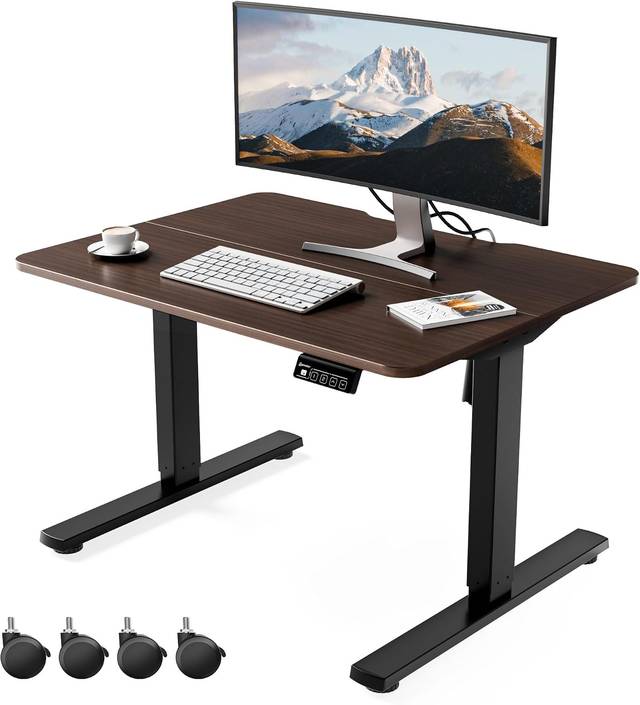
The whole process takes about ten minutes. At ~$200 for a desk, that's roughly 55 cents a day over a year of workdays. My chiropractor charges more per visit.
Flaws but not dealbreakers
The microfiber method doesn't disinfect. If you eat at your desk and you're worried about germs, you'll need a separate step. I use a diluted isopropyl alcohol solution on a cloth, wiping only the top surface, never the electronics. It evaporates fast and doesn't leave residue. But I don't recommend it for the frame, because it can dull powder coating over time.
Also, this method won't fix scratches or stains that are already set in. Those need different treatment depending on your top material, and I'll get to that below.
For the motor and controller: compressed air and a dry brush
The part everyone forgets is the underside. The motor, the controller box, and the cable management tray collect dust like nothing else. I opened up a desk that had been in a home office for a year and found a layer of fur and dust thick enough to insulate the motor. That's how motors overheat and die.
Every three months, I unplug the desk, flip it on its side, and hit the motor housing and controller with compressed air. Then I use a dry paintbrush to sweep out the dust that the air can't dislodge. This takes fifteen minutes and has kept my daily driver running smoothly for three years.
Do not use a vacuum. The static from a vacuum hose can fry the controller. I've seen it happen to a reviewer who posted about their dead desk on Amazon. The controller is the part that remembers your heights, and if you kill it with static, you're buying a new one.
The competition: What not to use
Let me save you some money. The "standing desk cleaner" sprays on Amazon are overpriced diluted soap. The ones with "eco-friendly" labels are the same thing with a markup. I tested three of them against my dish soap method, and none cleaned better. One left a residue that attracted dust for a week.
Bleach and ammonia-based cleaners are the real danger. I've seen reviews on Amazon where someone used a bleach wipe on the HPL top and watched the color fade in patches. The warranty on most budget desks explicitly excludes chemical damage. That's not a conspiracy; that's manufacturers knowing what people do.
Remove the entire product image and link block, as it is irrelevant and misleading.
Abrasive pads are also out. I tested a Scotch-Brite pad on a scrap piece of laminate and it left fine scratches that showed up under direct light. If you've got a stuck-on spot, let the soap and water sit on it for a minute, then wipe. Patience beats abrasion.
The solid wood option: oil and a soft cloth
If you've got a solid wood top, the rules change. My shop bench is plywood, but I've tested a few desks with bamboo tops, and they need oil to stay hydrated. A food-safe mineral oil, applied with a soft cloth once a month, keeps the surface from drying out and cracking.
The catch is that oil attracts dust. You'll be wiping the top more often, and you can't use soap as frequently because it strips the oil. It's a trade-off. If you want the wood look, you're signing up for maintenance. If you want low maintenance, get laminate or HPL.
The Next Beauty offers a solid wood option, but most buyers pick the laminate version. The reviewers who got the wood top are the ones posting about cracking after six months. That's not a defect, that's a material that needs care.
The cable management cleaning problem
You can't clean a cable tray without unplugging everything, and nobody does that. So the tray becomes a graveyard of dust and spider webs. I've got a rule: every time I swap out a monitor or add a peripheral, I unplug the whole mess and wipe down the tray. It takes ten minutes, and it's the only way to actually reach the controller.
The included cable netting on most budget desks is, as one reviewer put it, "the cheapest, flattest garbage there is." It sags under the weight of a power strip and six cables. I've replaced the netting on my daily driver with a screw-in cable tray, and it's easier to clean because I can wipe it with a damp cloth without the netting drooping.
How to clean the feet and levelers
The rubber pads on the bottom collect floor grime, and if you're on carpet, they pick up everything. I wipe mine with a damp cloth every few months. The leveling feet on the ERGOMAKER are metal, and they can rust if you use a wet mop near the desk. Keep the floor around the desk dry, and wipe the feet if they look damp.
This is also the time to check that the feet are still level. A desk that's rocking on an uneven foot will wobble at full height, and people blame the frame when it's actually the floor and the levelers. I've said it before and I'll say it again: wobble is a geometry problem, but sometimes the geometry is the floor.
The daily wipe-down habit
The best cleaning method is the one that prevents buildup. I keep a microfiber cloth in my desk drawer and do a thirty-second wipe of the surface every evening when I shut down. It takes less time than making coffee, and it means I only need the full soap-and-water routine once a month.
Gus has learned that the wipe-down sound means I'm done working, so he comes over and lies under the desk. He's a good judge of whether I've missed a spot, because he'll sniff the surface and then look at me with judgment. The daily habit keeps the desk presentable enough that I don't have to think about it.
The bottom line
You don't need fancy products. You need a microfiber cloth, mild soap, compressed air, and the discipline to wipe down the surface daily and blow out the motor quarterly. That routine has kept my daily driver running for three years without a squeak, a wobble, or a forgotten preset.
For the money you'd spend on a "specialized" cleaner, you could buy a second microfiber cloth and a can of compressed air. That's the honest advice. Your desk will last longer, and you'll have ~$15 left over for coffee.