Related: Standing Desk Height Guide for Tall and Short Users
I have owned five standing desks and disassembled most of them. The failure is never dramatic. A desk either sways when you stand up, or it turns into a nest of cables you stop looking at, and either way you quietly stop pressing the button. A standing desk cable management setup is not a hobby project. It is the difference between a desk that moves and a desk you actually move.
This guide covers two desks I would put in a working office and one small accessory that fixes the part most people ignore. The ErGear is the budget entry with memory presets. The Uplift Saman Butcher Block is the furniture-grade build with a real wood top. The Cinati tray is the no-drill answer to cable chaos on either one, and it is the least expensive way to make a desk feel finished.
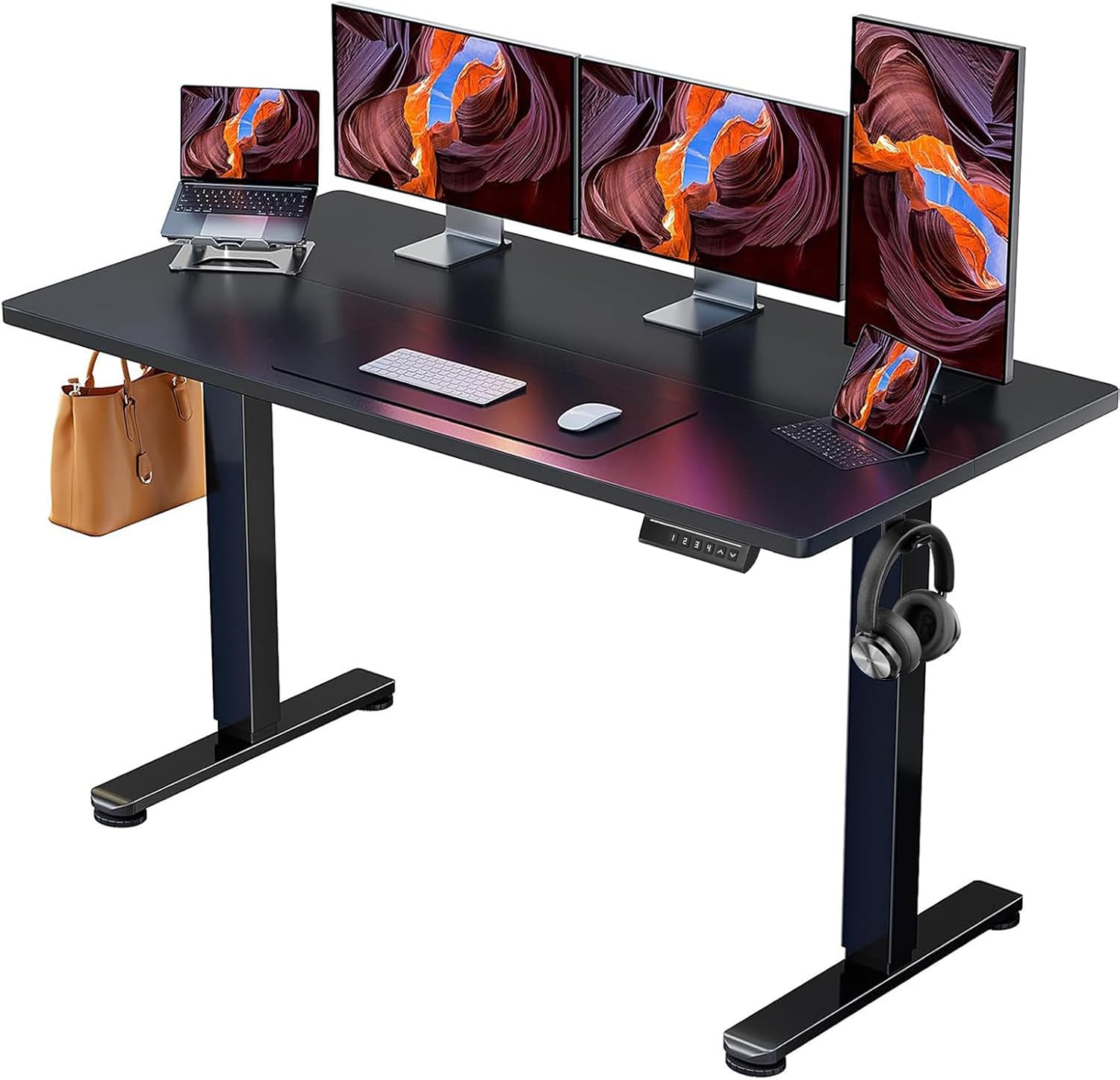
Best Budget: ErGear Height Adjustable Electric Standing Desk, 55 x 28 Inches
The ErGear is a 55 by 28 inch electric sit-stand desk in black, aimed at someone who wants the height feature without paying furniture prices. Memory presets are right in the name, and that is the spec I care about most at this end of the market. A desk where you have to hold a button and guess your height is a desk you stop adjusting by week three.
Fifty-five by twenty-eight is the size I recommend for one monitor and a laptop, or a laptop on a riser with a keyboard in front of it. It is not a two-monitor plus speakers desk, and it is not pretending to be. The black finish blends into a home office instead of trying to be a design statement.
The question that decides whether this desk works for you is wobble. Sway at standing height is a geometry problem, not a weight problem, and it is the thing manufacturers leave off the spec sheet. When the desk arrives, set it to your standing height, put your monitor on it, and type hard for a minute. If the top moves side to side more than you can tolerate, that is your answer, and it is better to learn it in the first week than in month six.
Presets matter for a second reason: they make the standing position repeatable. Set one for sitting, one for standing, and one for whatever height you use when you are reading or on a call. If the controller holds those after you unplug the desk for a weekend, the electronics are decent. If it forgets, you will be reprogramming it forever, and that is a real reason desks get abandoned.
One thing the ErGear does not solve is cable management. There is no tray, no channel, and no place for the power brick, so the cables end up hanging off the back edge where you can see them from the couch. That is exactly the problem the third product in this guide exists to fix.
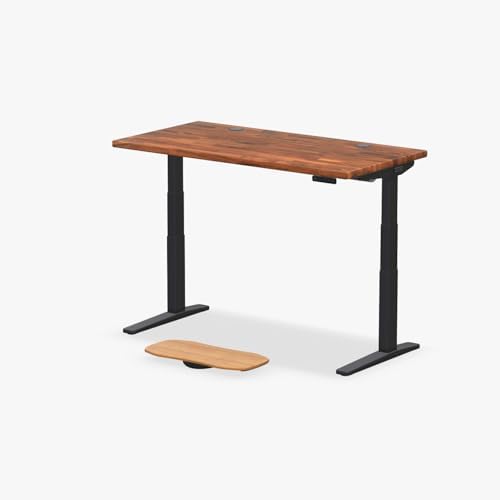
Best Overall: UPLIFT DESK Saman Butcher Block 60 x 30 Inch Standing Desk, 2-Leg V3 C-Frame
I keep coming back to the same belief after years of this: the top is interchangeable, the frame is the desk. The Uplift Saman Butcher Block is what that looks like when someone gets both right. You are buying a 2-leg V3 C-frame in black with a 60 by 30 inch butcher block top, and the frame is the part that decides whether you keep using it.
The C-frame geometry is why this desk holds still at height. The columns sit further apart and the load path is shorter, so the top does not act like a diving board when you lean on it. Sixty by thirty is a real working surface: two monitors, a lamp, a notebook, and room left over. The depth is the part people underestimate. Thirty inches means your monitor sits far enough away that you are not hunched toward it all day.
The kit includes an advanced keypad, wire grommets, a wire tray, and a rocker board. The advanced keypad is the piece I would pay for on its own, because it is the interface you touch every single day. The wire grommets and wire tray handle the run from the top down to the floor, which is the half of cable management most people forget. The rocker board is for standing on, and it is the difference between standing for twenty minutes and standing for an hour.
Butcher block is also the honest answer to the "is this furniture or is this office equipment" question. Real wood takes a finish, ages, and can be sanded back if you scratch it. A laminate top cannot. That is why I say buy the frame and find the top, and it is why this desk sits at the top of this guide rather than in the middle of it.
The trade-off is assembly and weight. Butcher block is heavy, and heavy is the point, but plan on two people and an afternoon. Budget the time, because a desk half assembled is a desk you cannot use.
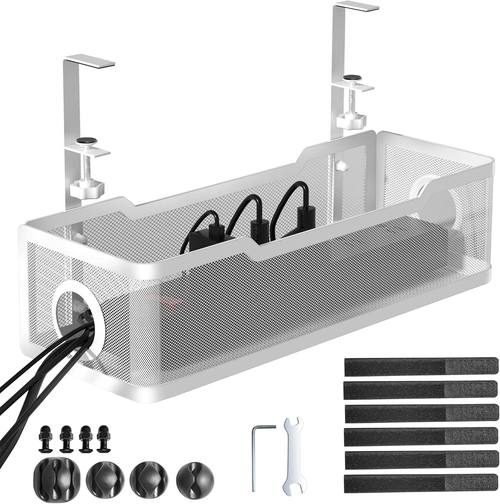
The Fix Nobody Budgets For: Cinati Under Desk Cable Management Tray, White, No Drill
Every desk in this guide has the same weak point: the cables. The Cinati under desk cable management tray is white, clamps on with no drilling, and is built to leave no damage on the desk. That last part matters if you rent, if you lease office furniture, or if you have ever put four screw holes in a top you later sold.
The tray mounts under the desk and holds the power brick, the slack in your monitor cables, and the run of the desk's own power cord. Once it is clamped on, the underside of the desk stops looking like a dropped plate of spaghetti. That is not just a cosmetic win. Cables that hang loose catch on chair arms and get yanked out of the desk controller, and a desk whose controller gets unplugged is a desk that loses its presets.
The one thing to check before you buy is the clamp. It grips the desk top, so you need to know the thickness of your top and whether the clamp opening covers it. Butcher block and laminate differ here. Measure the edge of your desk before you order, not after.
It also pairs well with the Uplift's included wire tray. Use the wire tray for the run down the frame and the clamped tray for the hardware and the slack. That is the setup I would build on either desk.
How I test a standing desk
Every desk I write about goes through the same routine, and I do not shortcut it.
The first week is a daily rotation: sitting in the morning, standing after lunch, and adjusting at least twice a day whether I feel like it or not. The point is to use the controller the way a real owner does, not the way a reviewer does for an afternoon.
The wobble test happens at full standing height with the desk loaded the way I actually work, which means a monitor, a laptop, and whatever else lives on the top. I type hard, lean on the front edge, and watch the top. Sway that shows up only at the exact height you use is the worst version, so I check more than one height.
Then the controller test: pull the power, wait, plug it back in, and see whether the presets survived. A desk that forgets is a desk that makes you fight it every morning.
Finally, the cable audit. I look at what the desk ships with, what I had to add, and whether the cables interfere with the motion of the desk. A cable that goes taut when the desk rises is a cable that will fail.
Analysis and test results
The pattern across every desk I have lived with is that stability and controller quality decide everything, and the top decides almost nothing.
Wobble is geometry. Two lifting columns and a rigid frame hold still. A single column or a frame with no bracing does not, no matter what the top is made of. That is why the Uplift C-frame feels like furniture and why a cheap frame with a heavy top still sways. You cannot fix a frame's geometry with a nicer slab.
Controllers are the quiet dealbreaker. Memory presets that survive a power cycle turn standing from a decision into a habit. If you have to hold a button and watch the number climb every time, you will stand less. I have watched this happen in my own office more than once.
Cable management is the third leg, and it is the one people skip. Cables that hang loose catch, snag, and eventually disconnect something. A clamped tray costs less than any other upgrade in this guide and removes the most common reason a height adjustable desk stops working the way it should.
And on the top: laminate, butcher block, or whatever you bolt on, the frame is what you are actually buying. Buy the frame, find the top, and put the money where the motion is.
Standing desk setup comparison table
| Product | Role in the setup | Top size | What to verify before buying |
|---|---|---|---|
 Visit on Amazon → Visit on Amazon →ErGear electric standing desk |
Budget electric sit-stand | 55 x 28 in | Wobble at your standing height, preset memory after a power cut |
 Visit on Amazon → Visit on Amazon →Uplift Saman Butcher Block V3 |
Furniture-grade 2-leg C-frame with butcher block top | 60 x 30 in | Assembly time, keypad behavior, whether the included wire tray covers your cable run |
 Visit on Amazon → Visit on Amazon →Cinati no-drill cable tray |
Cable management for either desk | Clamp-on | Clamp opening against your desk top thickness |
Every product here is sold on Amazon, where the listing carries the full specification sheet. Check current Amazon price and the current details there before you commit, because specs and bundles change.
Should you buy the ErGear Height Adjustable Electric Standing Desk?
If you want the height feature without furniture pricing, this is the sensible starting point. The 55 by 28 top fits one monitor and a laptop, the black finish disappears into a home office, and the memory presets are the feature that keeps you using the desk instead of parking it at one height.
Go in with your eyes open about wobble. Test it at your standing height in the first week with a monitor on it. If it holds still enough for your tolerance, you have a working sit-stand desk for a fraction of a premium frame. Add the clamped cable tray at the same time, because the ErGear does not include one and loose cables are what kill the controller.
Should you buy the Uplift Saman Butcher Block?
Yes, if the desk is going to be in your life for years. The 2-leg V3 C-frame is the stable part, the 60 by 30 butcher block is the surface you will actually enjoy, and the advanced keypad, wire grommets, wire tray, and rocker board mean you are not nickel and diming yourself with accessories afterward.
The cost is weight and assembly time. Butcher block is heavy, and you will want a second person. What you get for that is a desk that does not sway when you lean on it and a top you can refinish instead of replace. Buy the frame, find the top. This one already found it for you.
Should you buy the Cinati under desk cable management tray?
Yes, and this is the first thing I would add to either desk. It clamps on with no drilling, so it does not damage the top, and it gets the power brick and the slack off the floor and out of the chair's path.
Check the clamp against your desk top thickness before ordering, especially on butcher block. Beyond that, there is nothing to think about. It is white, it is hidden under the desk, and it turns the underside of a standing desk from a hazard into a shelf.